Education : no6 'Random Stuff 01'In Photoshop if you're making a tileable texture and have a layer with detail outside your canvas it will show when offsetting it. Easiest solution? Ctrl+A and then image>crop
Education : no5 'Starting a project'
Whenever I start a new project I usually spend 1-3 hours checking out reference and building a reference library. If one is supplied I pick out what those that I consider important and then continue to search for extra reference. From this I usually create my very own desktop wallpaper that has all key reference slapped on which I find quite helpful to be constantly reminded of the key aspects of the current project. The idea being that it will start sneaking into your subconscious mind while painting. Something like that.
Education : no4 'RGB tweaking in Normals'
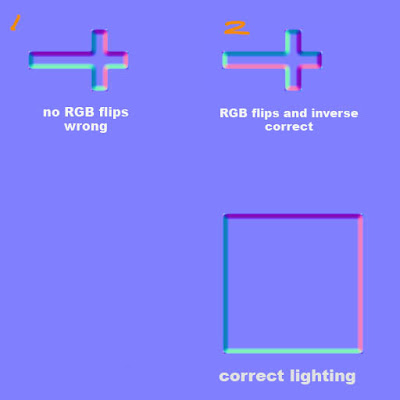 Classic normal map mistake problem here. Imagine you have normal mapped a coffin with a Crucifixion on top that had to have its uv's ROTATED to have a nice fit. Did you know this will mess with the lighting of the normals? Look at the square with proper lighting with purple on top, pink on right, dark blue on left and light blue on bottom. However in example 1, because the uv's were rotated the purple will now be on the left side of the cross instead of the top as seen with the square. I have a set of 3 short key actions that I can play with to rotate and flip the lights, these are 'Invert Red Channel', 'Invert Green Channel' and 'Flip RG'. As you can see in 2 I have changed it so that if it were to be rotated as intended the lights would be exactly the same as the square.
'Flip RG' incase you're wondering involves bringing up the channel mixer and then going into red channel. Take red to 0 and green to 100. Then go into green channel and take green to 0 and red to 100.
Remember, Red Channel shows light horizontally and Green Channel shows light vertically. Inverting these changes the lighting in your normal map.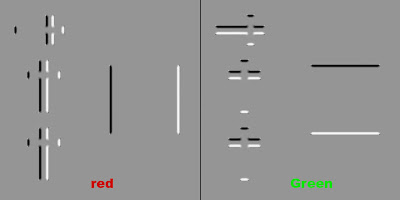
Education : no3 'Texture storytelling'For quite a while the idea of 'telling a story within your textures' felt a bit cliche to me. The problem initially was that I found it hard to get deeper then 'this door has a blood splatter that was caused from recent zombie carnage'.The following is a old PDF from the famous Leigh of CGtalk that's worth reading if you haven't already. Even if its just the first half.
http://www.leighvanderbyl.com/pdf/texturing.pdf
In regards to 'storytelling' its really just about asking yourself more open ended questions. So in the case of my terrible blood stained door example I would go on to think about questions such as how tall this zombie was?, what was it doing as its head exploded?, how thick is the blood?, when did this incident happen? What made his head explode? Its all about collecting ideas to play with, the more you have the more chance you have of creating a originally interesting texture.
Flashback : no1 'My first ever texture map'Managed to track down my first ever texture! Simply a horrible brown base with some noise (done with a filter I may add) and a photo of a rock surface, blending mode set to overlay. So boring, no focus points at all. Dull colours. How would I fix this now? Its not actually bad for a 'background' layer. I would lower the opacity by around 70-80% and start to paint on top of that. Adding subtle colour, focus points, occlusion etc. I never even got round to using this as it was so bad.


